If you're searching for how to pass the advanced HTML5 exam, you probably already know the CIW 1D0-720 isn't a trivia quiz. It's a 56-question, 75-minute test of whether you can actually build and style modern web pages, and the passing bar sits at 75%. That combination of a short clock and a high threshold is why so many capable developers walk out frustrated. The material isn't the hard part. The pacing and the format are.
This plan gives you a six-week path through the CIW Advanced HTML5 and CSS3 Specialist objectives. Each week has a defined focus, a hands-on build, and a timed check so you always know whether you're actually ready or just feeling ready. You'll map the official domains first, sequence your study so nothing gets skipped, and slot in practice tests with real error review from week two onward.
What the 1D0-720 Exam Actually Tests
Before you schedule anything, get the shape of the exam straight. The CIW Advanced HTML5 and CSS3 Specialist certification is identified by exam code 1D0-720, and according to CIW 1D0 preparation guidance, it runs 56 questions with a 75% passing score and a 75-minute time limit. The exam fee is $175, which is the number that should shape your study discipline. A retake is another $175.
That works out to roughly 80 seconds per question. Some items will take you 20 seconds. Others, especially code-reading questions where you trace what a selector or a media query actually does, will eat three minutes. Your study plan has to build the speed to absorb those swings.
The content itself covers the "web development trifecta" of HTML5, CSS3, and JavaScript, and the course assumes prior coding knowledge rather than teaching it from zero. If you're coming in cold on CSS, you'll want to confirm your foundation before you start the clock on this plan. The Site Development Associate exam covers the HTML and CSS basics this certification builds on, and the Web Foundations Associate exam sits one step below that. Neither is required, but both are useful self-checks.
The four domains you'll be tested on
The official objectives group into four areas, and they don't carry equal weight in your study time:
- HTML5 structure and semantics. Structure tags, universal markup creation, and code validation, including validation for mobile pages. The objectives explicitly call out explaining the practical value of validation, which tells you the exam cares about why, not just which tool.
- HTML5 multimedia. Video, audio, embed, and the attributes that control them.
- CSS fundamentals and CSS3. The box model, selectors, properties, backgrounds, and the CSS3 features layered on top.
- Advanced CSS3 techniques. UI components, accessible interfaces, menus and buttons, 2D and 3D transforms, transitions, and animations, plus responsive design techniques.
Notice how much of that last domain is about building things. Menus, buttons, accessible interfaces, animations. This is not an exam you can read your way through.
Why validation keeps showing up
W3C publishes recommendations that are considered web standards, and those standards are optimized for interoperability, security, privacy, accessibility, and internationalization. That's the reasoning behind the validation objectives. When the exam asks why you'd validate markup, the answer connects to those properties: standards-conformant code renders predictably across browsers and assistive technology. Reading through the W3C standard documentation once will make those questions feel obvious instead of arbitrary.
Before Week One: Set Up Your Six-Week Baseline
You need three things in place before the plan starts, and skipping any of them costs you a week later.
A working code environment. A code editor, a browser with solid dev tools, and a folder structure you can actually find things in. You'll be writing and testing HTML5 and CSS3 daily, so remove friction now.
A validation workflow. Know how you'll validate markup before you need to. Pick your validator, run one page through it, and read the output carefully. You'll do this repeatedly.
A baseline practice test. Take one full timed practice exam before you study anything. Yes, you'll score badly. That's the point. Your baseline tells you which domains are already solid and which need the bulk of your six weeks. Without it, you'll spread effort evenly and waste time on material you already know.
Set a target exam date at the end of week six and book it. A booked date creates the deadline pressure that makes a study plan real. If your schedule is unpredictable, book for the end of week seven and treat week six as buffer.
Build a simple error log
Open a spreadsheet with four columns: question topic, what you chose, what was correct, and why. This log becomes the single most valuable artifact of your prep. It's also where most candidates fail themselves. They take a practice test, see a score, feel something, and move on without ever writing down what tripped them up.
Every wrong answer goes in the log with a real explanation in your own words. If you can't write the "why" without looking it up, you don't understand it yet. That's the signal to go back to the material.
Weeks 1 and 2: HTML5 Structure, Semantics, and Multimedia
The first two weeks cover the foundation domains. This is where you build the habits that make the rest of the exam easier.
Week 1: structure tags and universal markup
Your goal is to write semantic HTML5 without thinking about it. Work through the structure tags one at a time, then build a single multi-section page that uses each one correctly. A blog layout with a header, navigation, main content area, article, sidebar, and footer covers most of what you need.
Then validate it. Fix every error and every warning. Do this three or four times across the week with different page types, and validation stops being a chore and becomes a reflex.
The objectives also call out universal markup creation, which means markup that adapts across devices rather than being written for one screen size. Build one page, then view it on a phone and a tablet. Note what breaks.
Week 1 check: Can you explain, out loud, why a given element is the right choice over a generic container? If you're reaching for generic containers out of habit, spend another day here.
Week 2: multimedia and validation depth
Week two adds video, audio, and embed elements. Build a page with a native video element, a native audio element, and an embedded third-party resource. Then break it deliberately. Remove an attribute, use an unsupported format, and see what the browser does. Understanding failure modes is what separates people who pass from people who nearly pass.
Spend the back half of week two on validation for mobile pages specifically. The objectives single this out, and it's a common gap. Mobile validation catches viewport and responsive issues that desktop validation misses.
Week 2 check: Take your first post-baseline timed practice test. Log every error. Compare your domain scores to your baseline. You should see movement in the HTML5 domains and almost none in CSS yet. That's expected.
Weeks 3 and 4: CSS Fundamentals and the Box Model
CSS is where the exam gets dense, and it's where the 75-minute clock starts to bite. Two weeks here, minimum.
Week 3: the box model and core CSS
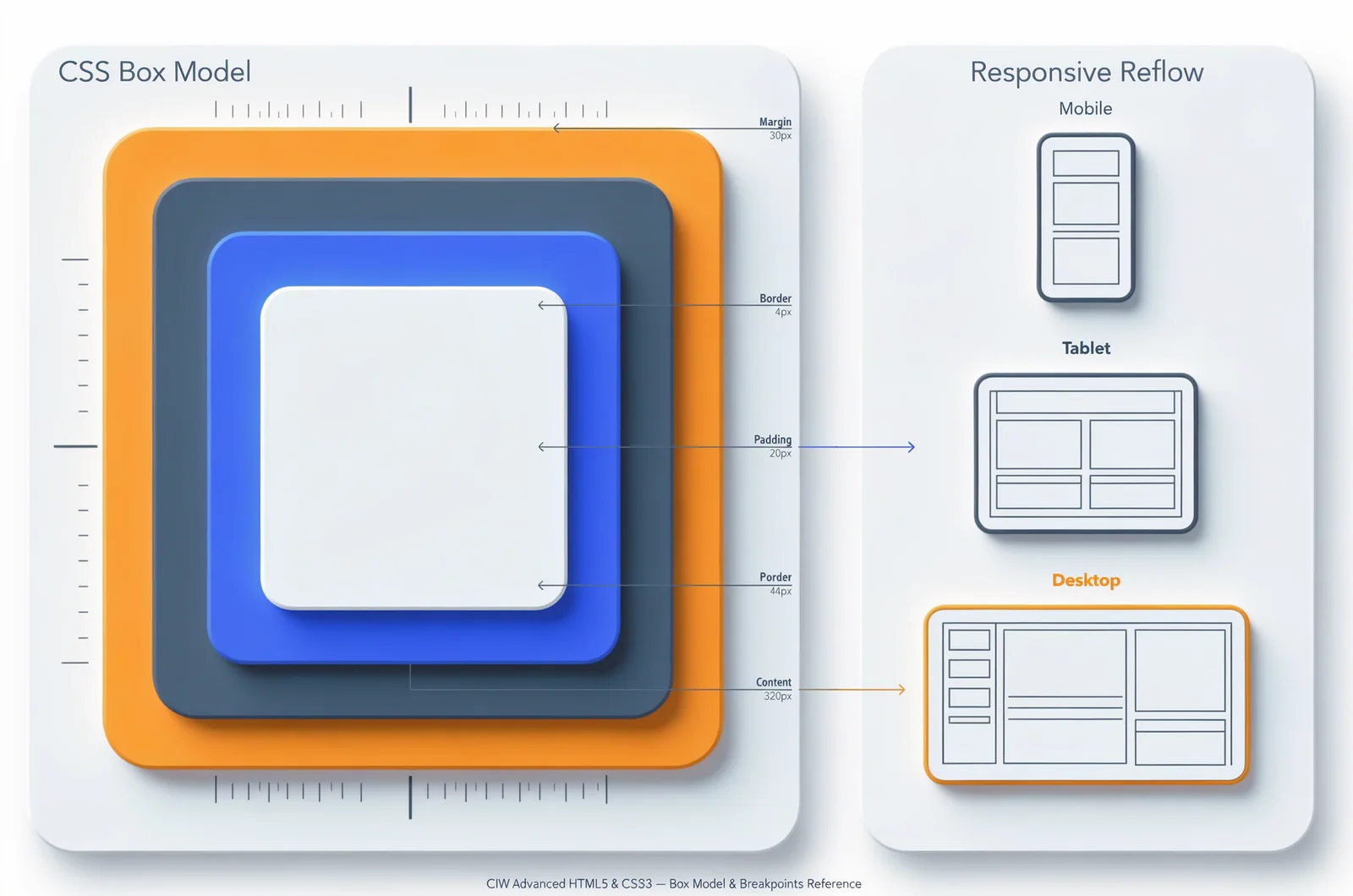
Start with the box model, because nearly every layout question traces back to it. The CIW student guide devotes a full lesson section to the CSS box model, including a case study, which tells you how central it is to the certification. Build a page where you can see content, padding, border, and margin independently, then change each value and watch what moves.
From there, work through selectors and properties systematically. Type selectors, class selectors, ID selectors, descendant selectors, pseudo-classes, pseudo-elements. Write each one by hand rather than copying. The exam will show you a selector and ask what it targets, and recognition isn't the same as understanding.
Backgrounds come next. Solid colors, images, positioning, and the CSS3 background properties that extend the basics. Build a hero section three different ways.
Week 3 check: Timed practice test, errors logged, domain scores compared. CSS fundamentals should be climbing.
Week 4: CSS3 selectors, properties, and responsive design
Week four moves into CSS3 proper. The student guide structures this as an introduction to CSS3 followed by CSS3 selectors and properties, then CSS3 background properties, and that sequence works as a study order too.
Responsive design deserves its own block. Media queries, flexible units, and the mobile-first approach. Build one page that rearranges itself meaningfully at three breakpoints. Not just shrinking, but actually reflowing. Then validate it again.
This is also the week to start timing yourself on individual questions. Set a timer for 80 seconds, answer one practice question, and check. Do twenty of these across the week. You're training pace, not just knowledge.
Week 4 check: Timed practice test. You should be at or above 65% overall by now. If you're not, week five needs to include remediation on your two weakest domains, and you should consider pushing your exam date.
Weeks 5 and 6: Advanced CSS3, Transforms, and Animations
The advanced CSS3 domain is the largest single block of objectives, and it's the one most candidates under-prepare because it feels optional. It isn't.
Week 5: UI components, transforms, and animation
Work through CSS3 UI components first. Menus, buttons, and accessible interfaces. The objectives pair accessibility with interface creation, so build a navigation menu that works with keyboard navigation, not just a mouse. Test it with the tab key. If you can't reach every item, fix it.
Then transforms. 2D and 3D. Rotate, scale, translate, skew, and the perspective and transform-style properties that make 3D work. Build a card that flips on hover using a 3D transform. It's a small project that forces you to understand the whole transform stack.
Transitions and animations come last. Transitions for state changes, keyframe animations for sequences. Build a loading indicator with keyframes and a button with a transition. Then answer this: what's the difference between a transition and an animation, and when would you pick each? If you can't answer cleanly, you're not ready for the questions that ask it.
Week 5 check: Two timed practice tests this week, spaced at least three days apart. Log errors after both. Your advanced CSS3 domain score should now be your focus metric.
Week 6: full simulation and error review
No new material in week six. This week is about converting knowledge into a passing score under pressure.
Take a full timed practice exam every other day. Between exams, review your error log. Not skim it. Work through it. For every logged error, re-derive the correct answer from first principles and write a one-sentence rule you can apply next time.
The day before your exam, review your error log one final time and stop. No new material, no cramming. Sleep.
How to Use Timed Practice Tests Without Wasting Them
Practice tests are the highest-value study tool you have, and most people use them wrong. Here's the difference between a useful test and a wasted one.
Simulate the real conditions. 56 questions, 75 minutes, no pauses, no notes, no looking things up. If you take a practice test with a browser tab open to documentation, you're measuring the wrong thing. The exam won't let you do that.
Review before you score. Before you see your total, go back through every question you flagged and write down why you flagged it. Then score. Then review every wrong answer and every lucky guess. A question you got right by accident is a question you got wrong.
Track domains, not just totals. A 78% overall with a 50% in advanced CSS3 is not a passing profile. It's a coin flip that happened to land well. Your domain breakdown tells you where the next study block goes.
Space them out. One practice test per week in weeks two through four, two in week five, and every other day in week six. Cramming tests back to back measures fatigue, not readiness.
If you want a structured way to run these, the 1D0-720 practice tests give you a timed simulator with per-question explanations, which matters more than the score. When an explanation doesn't land, that's the moment to dig into the underlying concept rather than memorizing the answer. Understanding why a selector behaves the way it does is what carries you through unfamiliar questions on test day.
A quick readiness estimator
Before you book, run this simple check. Take three timed practice exams across one week. If all three land at 80% or above, with no single domain below 70%, you're ready. If your scores swing more than 10 points between attempts, you're not ready yet. Variance means gaps, and gaps are what the real exam finds.
Where Candidates Lose Points on This Exam
These are the recurring failure patterns, and each one is fixable in the time you have left.
Treating validation as a checkbox. The objectives ask you to explain the practical value of code validation, not just perform it. If you can't articulate why standards-conformant markup matters for interoperability and accessibility, you'll miss those questions.
Skipping 3D transforms. They feel like a novelty, so people skim them. The objectives list 2D and 3D transforms together, and the exam tests both.
Ignoring accessibility in UI components. The objectives explicitly pair accessible interfaces with CSS3 UI creation. Menus and buttons that only work with a mouse are incomplete answers.
Reading code instead of writing it. You cannot build muscle memory for CSS by reading about CSS. Every concept in this plan needs a build attached to it.
Never timing yourself. Knowledge without pace fails a 75-minute exam. Start timing in week four, not week six.
Test-Day Decisions That Protect Your Score
A few practical choices on exam day are worth more than another hour of studying.
First pass, then second pass. Go through all 56 questions once, answering everything you know quickly and flagging anything that takes more than 90 seconds. Then return to the flags. This prevents one hard question from eating five minutes you needed elsewhere.
Read the code questions twice. When a question shows you markup or CSS, read the code before you read the answers. Form your own expectation first. Then check the options against it. Reading answers first primes you toward plausible-looking wrong choices.
Trust your preparation on ambiguous items. If two answers both look defensible, pick the one that aligns with standards-based practice and move on. Second-guessing burns time and rarely changes the outcome.
Watch the clock at the halfway mark. At 37 minutes, you should be roughly halfway through. If you're behind, speed up your first pass and rely on your flag-and-return strategy.
Questions Candidates Ask Before Booking
How long should I actually study for the 1D0-720? Six weeks at roughly 8 to 10 hours per week is a realistic target for someone with existing HTML and CSS experience. If you're newer to CSS, add two weeks and use the first two for fundamentals rather than starting the clock immediately.
Is the exam mostly code reading or recall? Expect a heavy code-reading component. The objectives emphasize applying properties, creating components, and performing validation, which translates to questions where you analyze markup rather than recite definitions.
What score should I be hitting on practice tests before I book? Aim for 80% or above across three consecutive timed attempts, with no single domain under 70%. Anything lower and you're paying $175 to find out what you already know.
Do I need to memorize every CSS3 property? No. You need to understand the categories and know how the commonly tested properties behave. Memorizing a property list without understanding the box model, specificity, or the transform stack won't help you on applied questions.
What if I fail? You pay the fee again and retake. That's the real cost of under-preparing, and it's why the timed practice tests in this plan aren't optional. Treat every practice attempt as a $175 rehearsal.
Can I use documentation during the exam? No. Build your recall now, because test day gives you a clock and nothing else.
Building the Page That Proves You're Ready
Here's a final exercise worth doing in week six. Build one page that uses every major objective: semantic structure tags, validated markup, native video and audio, a responsive layout with at least three breakpoints, an accessible navigation menu, a CSS3 button with a transition, a 3D transform, and a keyframe animation.
Then validate it, test it with keyboard navigation, and view it at three screen sizes. If everything works, you've demonstrated the full scope of the certification in a single artifact. That page is a better readiness signal than any score, because it proves you can do the work the exam is measuring.
Keep your error log. Keep the page. Walk in with both behind you.
References
- Advanced HTML5 and CSS3 Specialist: — ............................................................................................... 2-21 The CSS Box Model
More CIW and Exam-Format Guides