
Essentials Sample Questions & Answers
Free Essentials practice questions with worked answers and explanations. See how the ExamJungle simulator prepares you — then jump into the full test.
Launch the full Essentials simulator →Showing 6 of 12 free samples.
- Question 1
Match the monitoring tool to the correct task.
Which is not a Fireware monitoring tool? (Select one)Show answer & explanation
Correct answer: B
Explanation:
The Fireware monitor and configuration tools are: Edge Web Manager, Firebox System Manager, HostWatch, and Ping.
Reference: Fireware Basics, Courseware: WatchGuard System Manager 10, pages 15, 34, 59, 181 - Question 2
Match each WatchGuard Subscription Service with its function.
Uses signatures to provide real-time protection against network attacks. (Choose one).Show answer & explanation
Correct answer: C
Explanation:
Intrusion Prevention Service (IPS) -- As with the other IPS offers, the IPS module is intended to detect and in real time mitigate intrusions coming into a network. This includes a large signature data base that monitors for spyware, SQL injections, cross-site scripting (XSS), and buffer overflows.
Reference: http://www.tomsitpro.com/articles/network-security-solutions-guide. 2-866-6.html - Question 3
Match the monitoring tool to the correct task.
Which tool can learn the status of your IPS signature database? (Select one)Show answer & explanation
Correct answer: D
Explanation:
To look up information about an IPS signature: • Open Firebox System Manager. • ect the Subscription Services tab. • In the Intrusion Prevention section, click Show.
Reference: Fireware Basics, Courseware: WatchGuard System Manager 10, pages 15, 34, 59, 181 - Question 4Select 3
Which of these options are private IPv4 addresses you can assign to a trusted interface, as described in RFC 1918, Address Allocation for Private Internets? (Select three.)
Show answer & explanation
Correct answers: A, B, D
A, B, D
A, B, D
A, B, D
- Question 5Select 3
After you enable spamBlocker, your users experience no reduction in the amount of spam they receive. What could explain this? (Select three.)
Show answer & explanation
Correct answers: A, B, D
A, B, D -- Explanation:
A: Spamblocker requires DNS to be configured on yourXTM device B: If you use spamBlocker with the POP3 proxy, you have only two actions to choose from: Add Subject Tag and Allow. Allow lets spam email messages go through the Firebox without a tag.
D: The Firebox might sometimes identify a message as spam when it is not spam. If you know the address of the sender, you can configure the Firebox with an exception that tells it not to examine messages from that source address or domain.
Reference: Fireware Basics, Courseware: WatchGuard System Manager 10, page 138A, B, D -- Explanation:
A: Spamblocker requires DNS to be configured on yourXTM device B: If you use spamBlocker with the POP3 proxy, you have only two actions to choose from: Add Subject Tag and Allow. Allow lets spam email messages go through the Firebox without a tag.
D: The Firebox might sometimes identify a message as spam when it is not spam. If you know the address of the sender, you can configure the Firebox with an exception that tells it not to examine messages from that source address or domain.
Reference: Fireware Basics, Courseware: WatchGuard System Manager 10, page 138A, B, D -- Explanation:
A: Spamblocker requires DNS to be configured on yourXTM device B: If you use spamBlocker with the POP3 proxy, you have only two actions to choose from: Add Subject Tag and Allow. Allow lets spam email messages go through the Firebox without a tag.
D: The Firebox might sometimes identify a message as spam when it is not spam. If you know the address of the sender, you can configure the Firebox with an exception that tells it not to examine messages from that source address or domain.
Reference: Fireware Basics, Courseware: WatchGuard System Manager 10, page 138 - Question 6
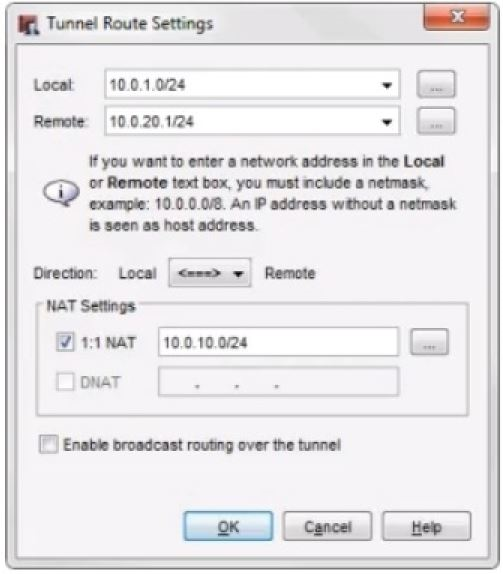
A local branch office VPN tunnel route is configured as shown in this image. On the remote peer device, what must be configured as the remote network address for this tunnel route? (Select one.)
Show answer & explanation
Correct answer: B
B
Ready for the real thing?
The full Essentials simulator has every exam-style question, timed mode, and instant scoring.